
Ford Blue Cruise 1.5 Does The Driving When You Don’t Want To
Hands free highway driving is the gift you need to give yourself.

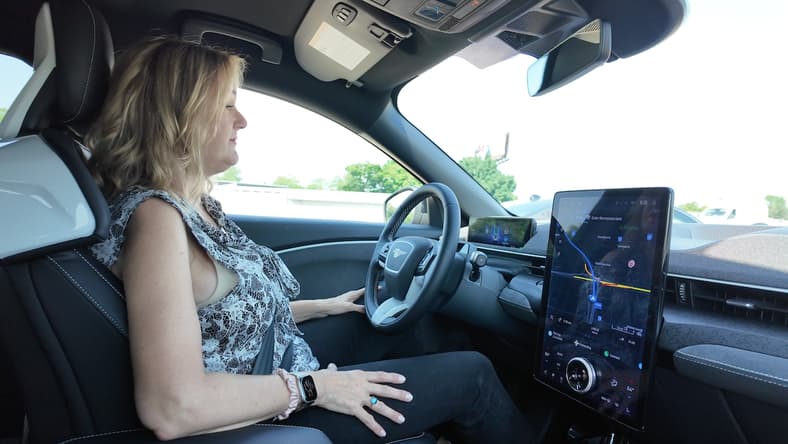
I’ve had front seat to Ford Blue Cruise for a while now and I’ll just start by saying, I use it and I like it, even in its earlier, less sophisticated versions. Ford is constantly making improvements to this hands-free driving system and with the 1.5 edition, it’s sharper, easier to use and offers some great new features.
I like how it’s priced—you can choose a full purchase, buy it by the year or subscribe by the month—and I like the graphic indicators on the driver display that are clear and easy to see.
Now, all that is better in the latest iteration, Blue Cruise 1.5.
This story is 100% human-researched and written based on actual first-person knowledge, extensive experience, and expertise on the subject of cars and trucks. Additionally, I was Ford’s guest for this drive experience but all opinions are my own.
Which Models Have Blue Cruise 1.5?

Ford recently rolled out this updated Blue Cruise 1.5 system in the 2025 Mustang Mach-E, but it’ll be available in most newly redesigned Ford models in the future. It *may* even be updatable to those with Blue Cruise 1.4, which would include the Ford Expedition and Lincoln Navigator, but that’s another bit of news for another day; Ford representatives wouldn’t say.
They did say, however, that Blue Cruise 1.5 will be on the Ford Explorer Tremor edition coming out later this year. And that’s the good news. The bad news (sort of…) is that older systems with Blue Cruise 1.3 and earlier cannot be updated to 1.5 which because the new system uses different hardware. Only Ford models with the hardware upgrade can operate Blue Cruise 1.5 and those models should be able to accept over the air updates as they roll out, too.
Read: Hands-Free Driving Systems Mean More Safety, Less Stress On the Road
Ford Blue Cruise 1.5: What Is It?
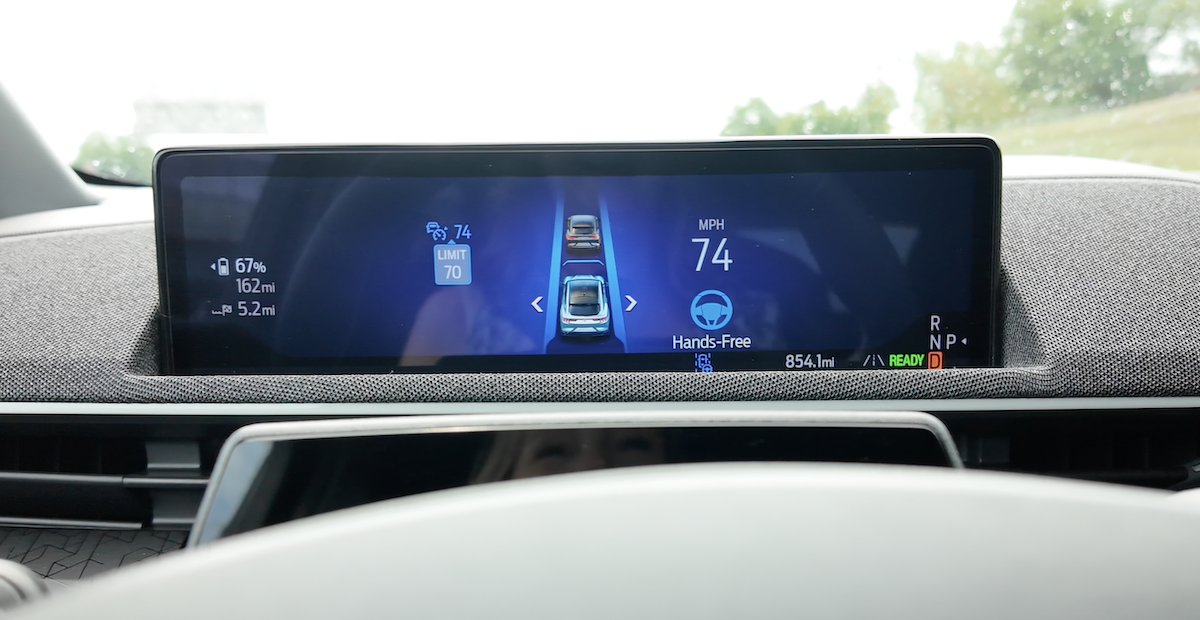
Ok, now that we have the details sorted on where you can get Blue Cruise 1.5, what exactly is it? This is Ford’s hands-free highway driving assist system advanced with new features and benefits. This includes automatic lane change assist, better lane centering and better traffic monitoring.
Ford’s goal is for the system to drive on the highway the way you would, changing lanes to keep you at your set speed, monitoring cars around you to avoid unsafe lane changes, to slow down for curves and then, the big one, in my opinion: to move away from cars that are too close to the lane markers and also, too close to you.
Read: I Took a Solo Road Trip in the Mustang Mach-E Using Public EV Chargers. This is How It Went
Improvements May Sound Small, But Really, They’re Pretty Big

While automatic lane changing is great, it’s more of a party trick; fun but maybe not all that important to your drive experience? You do have to pay attention and as the driver, you need to know what the system is doing.
In my opinion, the bigger improvement is better traffic monitoring and reactive lane centering.
Ford studied when and why drivers take over the wheel when using Blue Cruise and found that often it’s because the car in the lane next to you comes too close for comfort (stay off your phones, people!).
The new system is designed to note exactly where cars are around you and reposition you in the lane so you’re not riding mere inches from other cars—at 70 MPH, of course.
I can attest, that’s when I grab the wheel using Blue Cruise 1.3 on the highway; on my test drive using the 1.5 system, I didn’t feel the need to grab the wheel, even when riding next to trucks. This improvement is a big one.
Read: Towing While Using Hands-Free Driving? Yes!
Automatic Lane Change is the Big News in Ford-Land

This is the news Ford heralded with the update; it represents a leap in the technology, blending traffic monitoring, lane repositioning, steering and the turn signal to keep you moving at the speed you’ve set and with the pace of traffic.
When the setting is toggled on (keep reading for more on that) the system will monitor traffic and move the car from one lane to another as you drive. It worked perfectly, giving me enough space to feel comfortable and not cutting off other drivers.
Now, don’t you wish every driver on the road was using Blue Cruise 1.5?
Read More: 5 Things My Family and I Love About the 2025 Ford Explorer Platinum
How to Use Blue Cruise 1.5—Or, any Version For That Matter
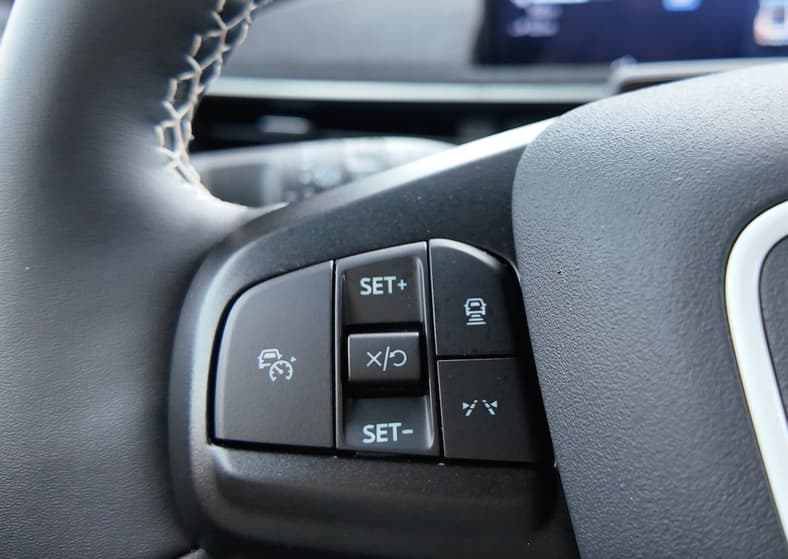
Ford made this one simple, and I will say, not all driver assist systems are all that simple; some are overcomplicated , so I appreciate that Ford made this easy: Push the button (far left on the steering wheel) and look for the blue steering wheel on the screen. That’s it. If highway and driving conditions allow, Blue Cruise will activate — and illuminate the blue hands free icon.
If highway conditions don’t allow, adaptive cruise control will still activate but you can’t take your hands off the wheel; if you take your hands off for too long, a notification will let you know you need to put your hands on the wheel.
Read More: The 2026 Ford Explorer Tremor Finally Brings 3-Row Capability in a Smaller SUV
Is Blue Cruise Customizable? Yes!
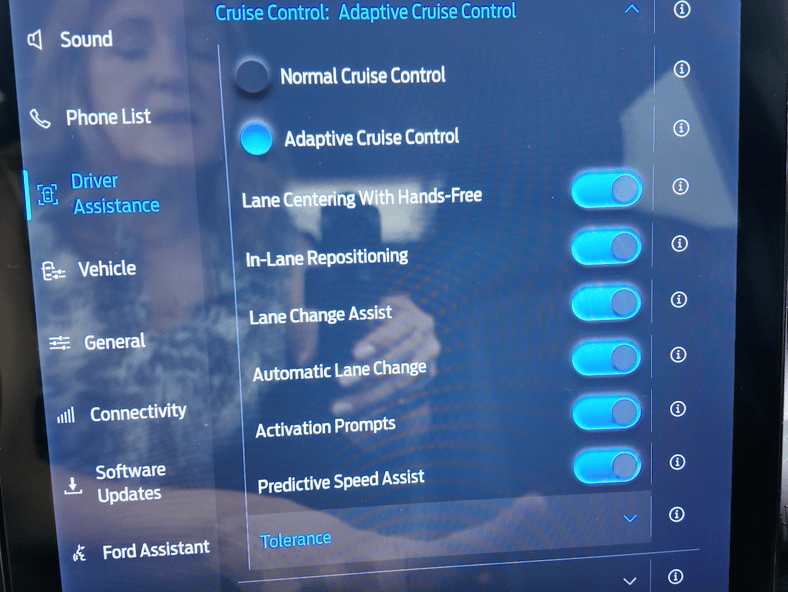
This is a really great feature: In Ford’s nicely designed multimedia screen you can tap Driver Assist and under the Cruise Control menu you’ll find all the Blue Cruise options. I will confess, most of us just tap on Blue Cruise and let it run using factory settings, but who does that with their phone? Their laptop? Nest thermostats?
Tap the Adaptive Cruise Control setting and toggle on the settings you want, or don’t. Don’t like automatic lane change? Turn it off (the system will still change lanes for you when you tap your turn signal). Don’t want speed limit assist, which notifies you when you’re over the speed limit? Toggle it off. Not sure what Tolerance is? Tap the “i” next to the function for an explanation.
Tolerance Is a Great Setting With a Not So Clear Name
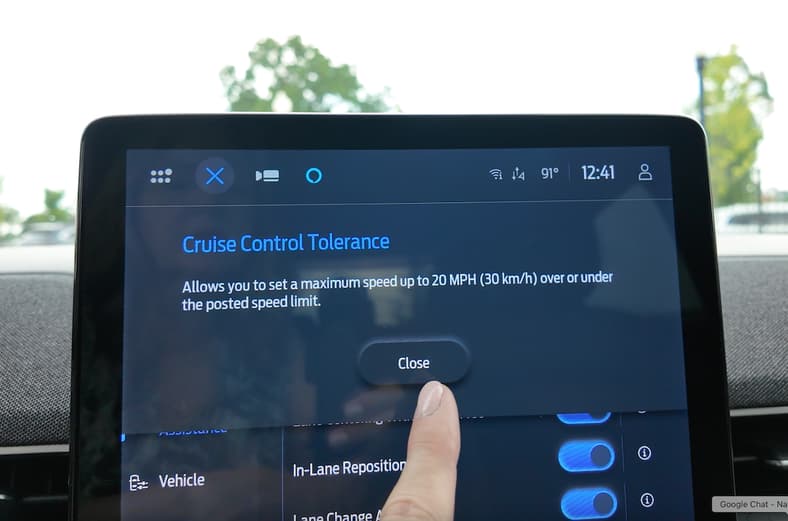
This one was a head-scratcher, though reading the explanation helped: Toggle on the Tolerance setting (which is also on earlier versions of Blue Cruise) and then use the slider to set an over- or -under speed that will adjust when the speed limit changes. I set it for 5 miles per hour over the speed limit and when the speed limit changed from 65 MPH to 55 MPH, my speed adjusted to 60 MPH.
On our test drive the speed limit changed several times and it was great to watch my speed adjust automatically.
My only suggestion is the name; perhaps Automatic Speed Adjustment would be more telling? Speed Minder? Ticket Prevention? Speed Trap Spoiler?
Blue Cruise Allows You To Override The System—Then Hand It Back Again

I love this about Blue Cruise, and the 1.5 edition keeps this feature: the driver can take control of the drive without interrupting the system.
If the system starts an automatic lane change, just tap the turn signal off to cancel the change, or grab the wheel and the lane change will cancel.
If you want to change lanes but need to speed up to keep a safe distance from a car in that lane, just give a little acceleration and make the change, as you would without the assist system at work. Once you make the change and release your hands from the wheel and take your foot off the accelerator, the system is at work. I think of this as advanced one pedal drive—if you touch the brake you cancel the system—and I really like it a lot. I use it a lot with Blue Cruise 1.3 and find it to be a nice blend of driver and technology.
What Blue Cruise 1.5 Costs

Ford wants everyone to have this system and if you ask me, you should have it, especially if you do any driving in heavy highway traffic. It’s great for road trips on long stretches of highway but even better, get it for commuting in heavy stop and go traffic. That’s where it’s worth its weight in gold. Uber driving, kid driving, carpooling, downtown commuting: Worth the investment.
To buy the system outright with the purchase of the car, Blue Cruise is $2,495; though buyers can subscribe for $495 a year or $49 a month. All models come with a 90 day free trial though some models, typically higher-tier trim lines, will offer a free year of Blue Cruise driving.
I love that you can get Blue Cruise for a month if you want it for a road trip but be careful. Once you get used to it, you’ll want it all the time. Ask me how I know.

More About:Car Culture